



Auto Boot — Easy Auto Boot (EAB) Box
(EAB TOOL • AUTO BOOT • Remove KG MDM FRP ID • F64 • MIPI • MEDUSA • EASY JTAG)
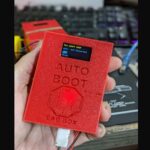
The Easy Auto Boot (EAB) Box is an advanced smart boot activation device engineered to simplify complex smartphone boot procedures. Designed for professional mobile repair technicians, this powerful tool enables automatic boot mode access during software flashing, unlocking, unbricking, and motherboard-level repair operations.
Equipped with a built-in smart OLED display, the EAB Box provides real-time system status, including boot readiness and WiFi connectivity updates. Its intelligent auto boot system reduces manual testing point work, minimizes repair risks, and improves overall workflow efficiency in repair labs.
The compact and durable design makes it ideal for everyday professional use. Whether you’re handling Qualcomm, MediaTek, or other chipset-based devices, the Easy Auto Boot EAB Box ensures stable communication and reliable boot activation performance.
🔓 PATCH & REMOVE
- Ultimate KG / MDM / FRP & Account Removal Suite (Android 14–16)
- 🔥 Windows-based professional tool for repair shops & pro users
- ✅ One‑click operations + step‑by‑step English guides + video tutorials
- 🔐 KG / MDM / PAYJOY / CLARO / FRP (Android 14 / 15 / 16)
- 🛡️ Remove KG / MDM restrictions on supported Samsung & OEM
- 🔓 Advanced FRP remove / bypass for latest security patches
- ♻️ Safe workflow: BACKUP → PATCH → RESTORE
- 👤 Huawei / Honor ID
- 🎯 Professional Huawei / Honor ID removal via modemst / oeminfo / nv
- 🧩 100% patch‑based: READ → PATCH → WRITE BACK
- 🖼️ Built‑in diagrams & screenshots inside the tool
- 🧾 Xiaomi / Redmi / Poco – Mi Account
- ❌ Remove / bypass Mi Account / MiACC using persist & database patch
- 🌍 China ➜ Global ROM support (cust / opcust / system customization)
- 🧠 Auto‑detects Mi Account strings, tokens & databases
- 📲 Multi‑Brand Coverage
- 🔵 Vivo / iQOO – ID/MDM/ FRP / account flows
- 🔴 OnePlus / Realme – ID/MDM / FRP / region lock
- 🟢 Motorola / Pixel – FRP remove / bypass (latest Android)
- ⚙️ Generic MTK / Qualcomm / Kirin – partition‑level patching
- 💻 Chipset Support
- ⚡ Qualcomm – EDL read/write (modemst, persist, fsg, oeminfo, cust…)
- 🔧 MediaTek (MTK) – META / BROM / Preloader flows
- 🐉 Kirin / HiSilicon – Huawei / Honor ID logic with safe modification
- 📚 Training & Support
- 📖 Full English-only documentation in every tab
- ▶️ Video tutorials for KG / MDM / FRP / ID / Mi Account / China→Global
- 🖼️ High‑res pinouts & examples (ISP / test‑point / before–after patch)
- 💼 Why EAB TOOL V2.3.3?
- 🧪 Built from real support cases & field logs
- 🔄 Continuous updates for new Android versions & patches
- 🧩 One tool + clear English guides = daily commercial solution for your shop
- 👉 INBOX NOW to get EAB TOOL V2.3.3 – CONSTELLATION PRO and start unlocking + repairing devices like a pro.
📱 Supported chips
HiSilicon/Kirin config3
Kirin 9000, 990, 980, 970…\nQualcomm
Kirin 9000, 990, 980, 970…\nQualcomm
🛠 Supported
- 🛠 Supported
- Complete Workflow | SHARE ISP UFS EMMC WITH COMMUNITY
- 🔑 AUTO ACTIVATION BY HASH ✨ v2.4,0
- • Box already activated on server (unlockprofast.com) → connect COM/WiFi and tool receives license automatically. No email/password needed.
- • Log: “Activating license (hash…)” → “LICENSE ACTIVATED!” → Full features enabled.
- • Admin activates once by HWID/hash → technicians just plug Box and Connect to use.
- 🔗 SHARE ISP UFS EMMC PINOUT WITH COMMUNITY ✨ NEW
- • Upload one image + enter model (e.g. S938B) → Tool normalizes format (PNG) and uploads to server. Community shares one library.
- • Type model (S938B, SM7550…) → Search: local first, then auto-download from server. One source, everyone can view.
- • Duplicate name → “Already exists” message, no overwrite, no overload.
- • Samsung / MTK / Qualcomm UFS EMMC pinouts — standard share, quick lookup.
- 📋 Share R list (Save R / Load from server)
- • Save R → upload to server. Open full list / Load from server → whole team shares the same model list.
- • One person saves → everyone loads. No manual file sharing.
- ☁️ F64: UFS Connected → Lock R, wait for ftp.upload TASK
- • Auto-scan: when F64 log shows “UFS Connected Successfully” → auto lock R, keep forever.
- • When log shows “ftp.upload TASK” → then allow closing tool or rescan. Standard F64 workflow.
- ⚡ Hacker UI, 3D buttons with icons
- • Dark theme, green accents. 3D buttons, clear icons. MODEL, DEVICE STATUS, CONNECTION, COM PORT, MANUAL TEST, ISP PINOUT.
- • Consolas font, clean layout. No CMD window (pythonw / .vbs).
- 🌐 Connection: Serial COM + WiFi
- • COM (CH340 / FT232R / CP2102 / PL2303) or WiFi 192.168.4.1. Box v1 (Arduino) & Box v2 (ESP32).
- • Auto-detect COM, baud 9600 / 115200 by box.
- 🧪 R test: 0Ω / 10Ω / 22Ω / 47Ω + 3s / 5s / 10s
- • Manual R buttons, Save R, Open list. START AUTO-SCAN, STOP SCAN keep value. Real-time progress & log.
- ✅ Features
- Goodbye to dead EMMC issues • Goodbye to UFS complications
- Compatible with all platforms • No mods or extra pieces
✅ Features
- Goodbye to dead EMMC issues • Goodbye to UFS complications\nCompatible with all platforms • No mods or extra pieces
Key Features:
- Intelligent automatic boot activation system
- Smart OLED display with live status monitoring
- WiFi connectivity for authentication & updates
- Simplifies EDL/BROM boot procedures
- Reduces manual test point dependency
- Stable USB-powered operation
- Supports multiple smartphone chipsets
- Compact, lightweight, and durable body
- Enhances repair speed and safety
- Ideal for professional repair centers
Technical Specifications:
- Product Name: Easy Auto Boot (EAB) Box
- Display Type: Integrated OLED screen
- Connectivity: USB interface
- Network Support: WiFi enabled
- Power Input: 5V USB powered
- Application: Smartphone boot activation & motherboard repair
- Supported Platforms: Qualcomm, MTK, and other chipsets
- Operation Mode: Automatic smart boot system
- Body Material: High-strength durable casing
- Usage Type: Professional mobile repair equipment


| Weight | 0.200 kg |
|---|---|
| Dimensions | 15 × 12 × 10 cm |